Multi-Currency Wallet2025

MultiPay

Turning six ways to move money into one form

MultiPay is a wallet for lari, dollars and euros. Top up from a card, move money between accounts, swap currencies, send to an IBAN. My job was to make none of it feel scary.

Role

Lead Product Designer

Timeline

10 weeks

Platform

iOS · Android

Year

2025

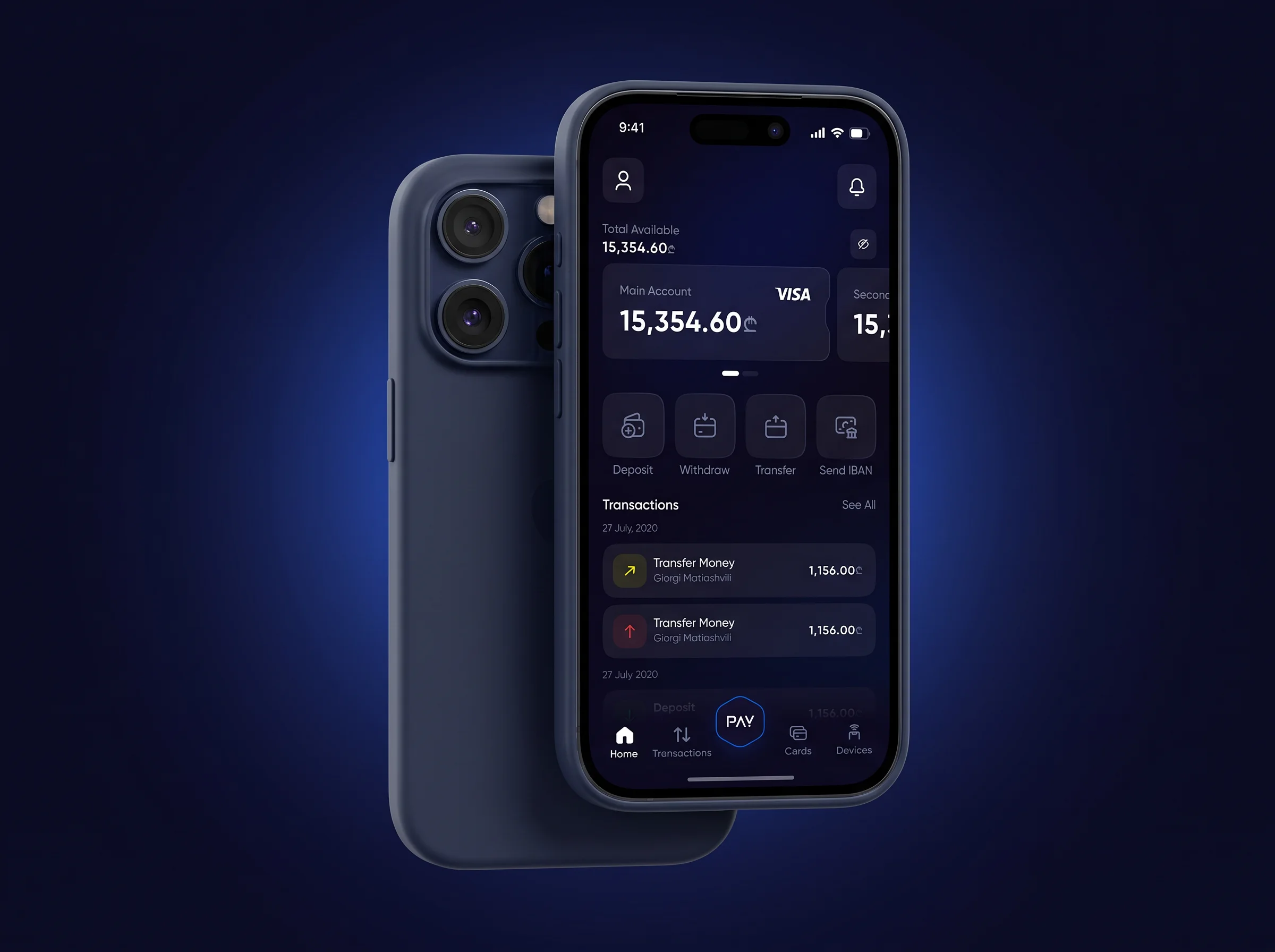
MultiPay home — total available balance, account carousel and quick actions
Internal transfer with currency exchange from a lari account to a dollar account
Transaction Successful — full-screen confirmation
TBC card detail with masked number, active toggle and card transactions
01The problem

People were using three apps to move their own money.

3

apps, just to move your own money

One per bank card. One for the exchange rate. A calculator for what’s left. Nobody knew how much they actually had.

Which app is my money in right now?

P07, user interviews · keeps three banking apps
01

“How much do I have?”

Lari in one place, dollars in another. No single number anywhere.

02

“Every screen is different.”

Top up, transfer, exchange, send abroad: four different forms to learn.

03

“Did it go through?”

Hit confirm, stare at a spinner. No idea if your money moved.

The insight

You don’t trust a screen. You trust a thing that works the same way every single time.

02The system

So every money move is the same three steps.

From where. To where. How much. Top-up, withdraw, transfer, exchange — same form, same order, same buttons. Learn one, you know them all.

Before · four rails, four forms

3 apps · nothing shared
  1. 01

    Top up a card

    Bank app one. Its own form, its own wording.

  2. 02

    Send to an IBAN

    Bank app two. Different fields, different order.

  3. 03

    Move between accounts

    Bank app three, if the accounts are even in the same place.

  4. 04

    Change currency

    A converter, then a calculator for what’s left.

After · one skeleton

6 flows · 1 pattern
  1. 01

    From

    Which account or card the money leaves. Always first.

  2. 02

    To

    Where it lands. A panel, so the form stays behind it.

  3. 03

    Amount

    Same quick-amount chips every time. Rate appears here if currencies differ.

  4. 04

    Verdict

    Pending, success or denied — full screen, same language, always a way back.

Deposit Funds — from a saved card to the Primary account with an amount field
Deposit
Card → account.
Withdraw To Card — choose account, choose card, amount
Withdraw
Account → card.
Internal transfer with currency exchange from a lari account to a dollar account
Cross-currency transfer
Two accounts disagree on currency — the form grows To Sell / To Buy and shows the rate.
First-time deposit — Add New Card and Choose Account empty states
First run
Same skeleton, empty. The pattern teaches itself.
03Key decisions

Five decisions that made it feel safe.

01

Your total is the first thing you see.

One number at the top: everything you have, all currencies, right now. Your cards sit under it. An eye icon hides the number when you’re on the bus.

Solves“How much do I have?”

MultiPay home — total available balance, account carousel and quick actions
Home
The answer to “how much do I have” — before anything else.
Transactions with search and filter chips for account, status and currency
Transactions
Search plus four filter chips — every entry findable in two taps.
02

Choices pop up over the screen. They don’t take you away.

Pick a card, an account, a direction — each slides up as a panel with the form still visible behind it. You never lose your place.

Solves“Every screen is different”

Transfer drawer offering Between Your Accounts or To Someone Else
The fork
Two destinations, one question.
Choose Your Card drawer with saved BOG and TBC cards
Choose card
Saved cards as tappable rows.
Choose Account drawer listing primary accounts in lari, dollars and euros
Choose account
Every currency, one list.
03

Exchange isn’t a separate thing. It just happens.

Nobody wanted a “currency exchange” screen — they wanted to move dollars into their lari account. So pick two accounts, and if the currencies differ the form shows the rate and does the swap. Same three steps.

Solves“Every screen is different”

Internal transfer with currency exchange from a lari account to a dollar account
Cross-currency transfer
Two accounts disagree on currency — the form grows To Sell / To Buy and shows the rate.
04

Every move ends with a clear answer.

Done. Or processing, and when it finishes. Or didn’t work, and how to retry. Full screen, same look every time. No spinner you stare at, wondering.

Solves“Did it go through?”

Transaction Processing — full-screen pending state
Pending
Says what’s happening and when it ends.
Transaction Successful — full-screen confirmation
Success
An unmistakable verdict.
Transaction Denied — full-screen error with a retry path
Denied
What went wrong, and the path to retry.
05

Your cards and devices live here too.

Freeze a card. See what it spent. Link an RFID tag to pay without your phone. No calling the bank.

TBC card detail with masked number, active toggle and card transactions
Card detail
Freeze it, trace it — without calling the bank.
Card details editor — number, expiry, CVC and rename action
Card management
Rename and edit in place.
Devices — empty state inviting the user to link an RFID tag
Devices
Link an RFID tag — pay without the phone.
04Results

What it did.

6

Kinds of money moves

Top-up, two withdraws, two transfers, exchange

1

Pattern for all of them

From → To → Amount

90+

Screens designed

Flows, states, panels, popups

0

Dead ends

Every flow ends with an answer

The best wallet is the one you stop thinking about.

More screens

Sign in — OTP code entry with resend timer
Sign in
OTP with a visible resend clock.
Notifications — updates, feature releases and performance improvements
Notifications
Read states at a glance.

Next case study

Generato

An app where you type a sentence and get a picture. Half of new users quit after one go.